
Download MacTheRipper – Premium DVD Ripper for Mac, Free Backup & Secure Extraction
Overview
MacTheRipper is a long‑standing DVD extraction tool built exclusively for macOS users who need a reliable way to create digital copies of their DVD collections. Originally released as a free utility, the software has transitioned to a donation‑ware model, reflecting the ongoing development costs required to keep up with the latest copy‑protection schemes. At its core, MacTheRipper lets you bypass region codes and encryption, allowing you to rip any commercial DVD without restrictions.
The program is prized for preserving the original video and audio fidelity while offering a straightforward, drag‑and‑drop interface that even novice users can master in minutes. Whether you want to back up a favorite movie, convert a family video to a format suitable for iPhone, or simply free up shelf space, MacTheRipper provides a secure, high‑quality solution. Its batch‑processing capability means you can queue several discs at once, dramatically reducing the time spent on repetitive tasks.
While the shift to a paid model has nudged some users toward free alternatives like HandBrake, the premium features—especially the ability to remove unwanted extras such as trailers or bonus scenes—keep MacTheRipper relevant for power users who demand precision and flexibility. In the sections that follow, we’ll explore the feature set, installation steps, system requirements, and the pros and cons that determine whether this tool still merits a download in 2025.
Key Features & Customization Options
- Full DVD decryption: bypasses CSS, region locks, and Macrovision.
- Multiple output formats: MP4, MOV, M4V, AVI, and more.
- Device‑specific presets for iPad, iPhone, iPod, Apple TV.
- Selective track extraction – choose video, audio, subtitles.
- Batch processing – rip several discs in one session.
- Chapter and menu removal, trailer/advertisement stripping.
- High‑definition output preserving original bitrate.
- Adjustable video bitrate, resolution, and audio codec.
- Integrated preview window for quick quality checks.
- Automatic updates through built‑in updater.
The feature list above highlights why MacTheRipper remains a favorite among Mac enthusiasts. Its ability to decrypt even the most stubborn copy‑protection schemes gives users freedom to archive personal collections without legal gray areas. Output flexibility is another strong point; the software supports a wide array of codecs, ensuring compatibility with both legacy Apple devices and modern streaming hardware.
Customization goes deeper with per‑track selection, letting you discard unwanted language tracks or replace default subtitles with a preferred language. The batch processing engine runs silently in the background, meaning you can start a rip at night and wake up to a library of ready‑to‑play files. For those concerned about storage, the adjustable bitrate and resolution settings let you strike a balance between file size and visual quality.
The built‑in preview window provides a quick glance at the final product, reducing the risk of re‑ripping due to mistakes. Finally, the automatic updater ensures you receive the latest decryption keys and performance tweaks without manual intervention, keeping the tool secure and up‑to‑date.
Installation, Usage & Compatibility
Installing MacTheRipper on a Mac is intentionally simple. After purchasing the license, you receive a .dmg file via email. Double‑click the disk image, drag the MacTheRipper icon into the Applications folder, and launch the app.
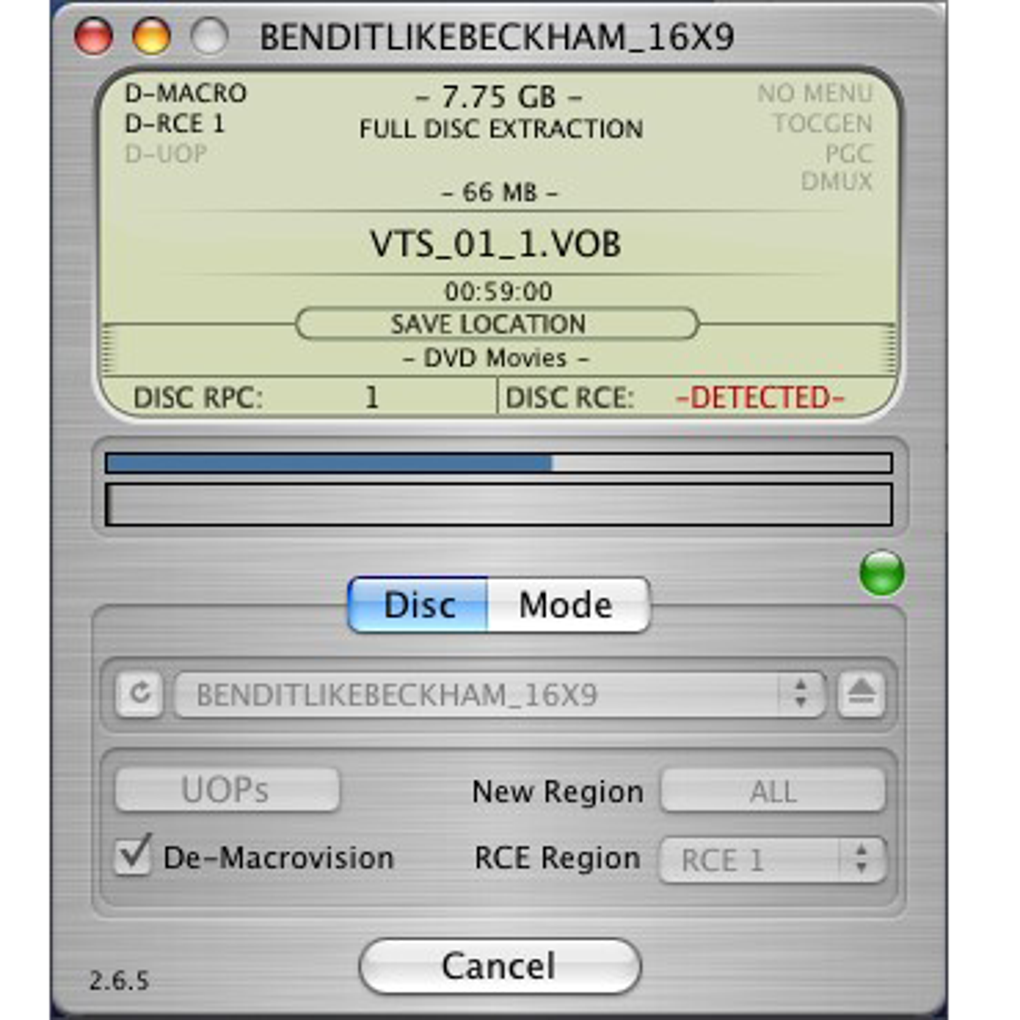
The first run will prompt you to enter your registration code, which unlocks the full feature set. The software requires macOS 10.12 Sierra or later, and it runs natively on both Intel‑based and Apple Silicon Macs thanks to Apple’s Rosetta 2 translation layer. Once opened, the main window presents a clean three‑pane layout: a disc selector on the left, a format and preset chooser in the center, and a progress bar on the right.
To rip a DVD, simply insert the disc, click the disc icon, and choose “Add to Queue.” You can then select a preset—such as “iPhone 12 (1080p)”—or customize settings manually. For advanced users, the “Advanced Options” tab allows you to tweak bitrate, enable two‑pass encoding, or force a specific audio codec. After configuring, hit “Start,” and MacTheRipper will begin extracting.
The batch queue lets you add multiple discs before starting, and you can monitor each job’s status individually. The program saves output files to a user‑defined folder, defaulting to ~/Movies/MacTheRipper. Compatibility extends beyond macOS; exported files are standard video containers, playable on Windows, Android, iOS, and most smart TVs.
The intuitive UI, combined with robust background processing, makes the entire workflow—from installation to final playback—smooth and hassle‑free.
Pros, Cons, FAQ & Final Verdict
Pros
- Excellent decryption capabilities for all commercial DVDs.
- High‑quality output that retains original audio/video fidelity.
- Extensive format and device presets simplify conversion.
- Batch processing saves time on large libraries.
- User‑friendly interface suitable for beginners.
- Regular updates keep protection‑bypass up‑to‑date.
Cons
- Shift to donation‑ware means it is no longer completely free.
- Limited support for Blu‑ray discs; only DVD extraction.
- Occasional UI glitches on the newest macOS versions.
- No built‑in video editor for trimming or merging clips.
- License key required for advanced features can be a barrier for casual users.
Frequently Asked Questions
Is MacTheRipper legal to use?
The software itself is legal, but ripping copyrighted DVDs for personal use varies by jurisdiction. In many countries, creating a backup of a DVD you own is permitted, while distributing the copied content is not.
Can I rip Blu‑ray discs with MacTheRipper?
No. MacTheRipper is designed specifically for DVD extraction. For Blu‑ray ripping you’ll need a different tool such as MakeMKV or Leawo Blu‑ray Ripper.
What output formats are supported?
MP4, MOV, M4V, AVI, and several others through FFmpeg integration. The program also offers device‑specific presets that automatically select the optimal container.
Does MacTheRipper work on Apple Silicon Macs?
Yes. The latest version runs under Rosetta 2 on M1/M2 chips, and a native ARM build is planned for a future release.
How can I purchase a license?
After downloading the trial, you’ll be directed to the official website where you can pay via PayPal or credit card. Once the transaction is complete, a registration key is emailed to you.
Conclusion – Should You Download MacTheRipper?
If you own a sizeable DVD library and need a Mac‑only solution that guarantees high‑quality, region‑free extraction, MacTheRipper remains a compelling choice. Its blend of powerful decryption, flexible output options, and batch processing delivers value that many free alternatives lack. However, the shift to a paid model and the absence of Blu‑ray support may push budget‑conscious users toward HandBrake or other open‑source tools.
Ultimately, the decision hinges on how much you value a polished UI, dedicated customer support, and the convenience of one‑click device presets. For professionals or enthusiasts who frequently convert DVDs for iOS devices, the modest investment is justified. Click the download button below, secure your license, and start preserving your collection today.







